
Internal linking strategy for bloggers is one of the simplest yet most powerful SEO techniques to improve rankings, increase page authority, and help search engines understand your content. Whether you’re a new blogger or an experienced content creator, optimizing internal links can dramatically improve your traffic without creating new content.
- What is Internal Linking in Blogging?
- Why Is Internal Linking Important for SEO?
- Types of Internal Links Bloggers Should Use
- Best Internal Linking Strategy for Bloggers
- Internal Linking Strategy for Bloggers Examples
- Internal Links Example
- Example of Internal Linking in HTML
- Internal Linking Best Practices Bloggers Must Follow
- How Many Internal Links Should a Blog Have?
- External Linking in SEO vs Internal Linking
- How to Build a Strong Internal Link Structure
- Common Internal Linking Mistakes Bloggers Make
- FAQ: Internal Linking Strategy for Bloggers
- Final Thoughts
This guide explains how internal links work, why they matter, types of internal links, examples, best practices, and step-by-step strategies you can apply today.
What is Internal Linking in Blogging?
Internal linking refers to creating links between pages and posts within the same website. When you link one blog post to another relevant page, it helps both users and search engines navigate your content easily.
Internal linking strategy for bloggers focuses on:
- Improving SEO and rankings
- Helping readers find related content
- Distributing authority across pages
- Increasing page views and session duration
Simply put, internal links connect the different pieces of your content like a map.
Why Is Internal Linking Important for SEO?
Internal linking is important for SEO because it helps search engines discover, index, and understand the relationship between your pages. It also boosts ranking potential by passing link equity across your website.
Here are key SEO benefits:
- Helps Google crawl your site efficiently
- Strengthens topical authority
- Boosts rankings for important pages
- Guides users deeper into your content
- Improves user experience and reduces bounce rates
When used correctly, internal linking becomes an SEO multiplier for your entire blog.
Types of Internal Links Bloggers Should Use
Understanding the types of internal links helps you build a balanced and effective internal linking structure.
Navigational internal links
These appear in menus, headers, footers, and sidebars. They help users move around major sections of your website.
Contextual internal links
These are links placed inside the content body. They connect related topics and help pages support each other contextually.
In-content links
In-content links guide readers to deeper articles, resources, or guides. They provide SEO value by passing topical relevance.
Anchor text links
These links use specific keyword-rich phrases that tell search engines what the linked page is about.
Image links
Clickable images used to link to specific pages or blog posts.
Best Internal Linking Strategy for Bloggers
Here is a practical strategy you can implement immediately to build strong internal links:
Step 1: Choose pillar pages and supporting articles
Pick high-value pages that should rank, such as ultimate guides or main service pages. Then link them with shorter supporting blogs that cover detailed subtopics.
Step 2: Use keyword-rich anchor text
Anchor text helps Google understand what the destination page is about. Keep it natural and descriptive.
Examples:
- internal linking strategy for bloggers examples
- internal linking best practices
- types of internal links
Avoid generic anchor text like “click here”.
Step 3: Add internal links from high-authority pages
Older posts with backlinks have stronger authority. Linking from these pages boosts the ranking of newer content.
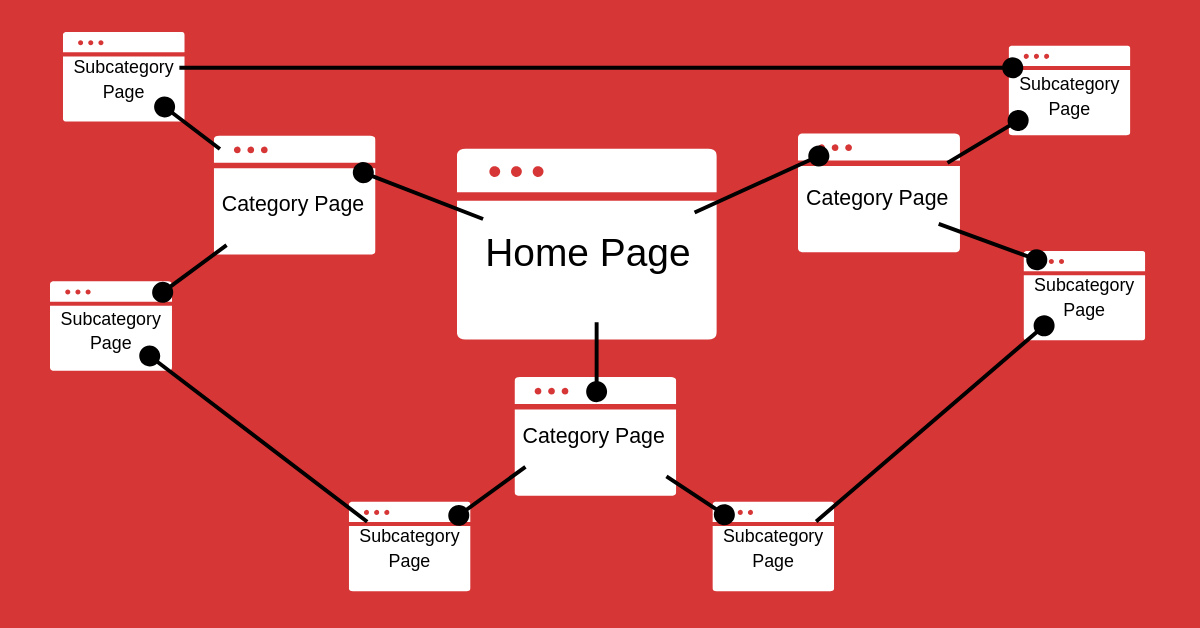
Step 4: Create topic clusters
Group related content together. A topic cluster strengthens your niche authority and boosts rankings for all cluster pages.
Step 5: Link to new posts immediately
Whenever you publish a new blog, link to it from at least 4–5 old posts to help it get indexed faster.
Step 6: Fix orphan pages
If a page has no internal link pointing to it, Google may not index it. Ensure every page has at least 3–4 internal links.
Internal Linking Strategy for Bloggers Examples
Here are real internal linking strategy examples you can apply:
Example 1: Linking from a general post to a specific guide
If you have a blog on SEO basics, link it to deeper guides such as keyword research or link building.
Example 2: Linking latest posts to older relevant articles
Whenever you write a new post, add internal links from old posts so readers can move further into the website.
Example 3: Using anchor text effectively
If you’re linking to a guide about on-page SEO, use anchor text like “on-page SEO checklist” instead of unrelated phrases.
Example 4: Linking to tools or resources
If you mention rewriting content using AI
This boosts the authority of the linked page.
Internal Links Example
Here is a simple example of how an internal link appears within content:
If you want to improve your search rankings, learning the internal linking best practices will help you build a stronger SEO foundation.
Notice that the anchor text is descriptive and relevant to the linked page.
Example of Internal Linking in HTML
Here’s a basic HTML code example used for internal linking:
<a href="/internal-linking-guide">Learn more about internal linking strategies</a>
This is how internal links are added within a website’s content structure.
Internal Linking Best Practices Bloggers Must Follow
To maximize SEO impact, follow these internal linking best practices:
Use 3–5 internal links per blog post
Longer posts can include 8–12 links. Keep it natural.
Use relevant anchor text
Avoid keyword stuffing but try to include variations of your keywords.
Link to fresh posts
New articles need internal links to get indexed quickly.
Avoid linking to competing pages
Don’t confuse Google by linking unrelated content to each other.
Maintain a link hierarchy
Important pages should receive the most internal links.
Avoid broken internal links
Fix any dead links to maintain your site’s crawlability.
How Many Internal Links Should a Blog Have?
There is no fixed number, but a safe recommendation is:
- 3–5 internal links for short posts
- Up to 10–12 for long blog posts
- Ensure every page has at least 3 internal links pointing to it
Focus on relevance rather than quantity.
External Linking in SEO vs Internal Linking
While internal links connect pages within your site, external links connect your content to other websites.
Internal links help with:
- Navigation
- Site authority distribution
- Topical relevance
External links help with:
- Credibility
- Reference validation
- Building trust with Google
A strong SEO strategy uses both appropriately.
How to Build a Strong Internal Link Structure
Use this step-by-step system:
Step 1: Audit existing internal links
Check for broken links and orphan pages.
Step 2: Build topic clusters
Organize content into main topics with subtopic support pages.
Step 3: Add contextual links
Within content, link to relevant guides readers may find helpful.
Step 4: Update older posts regularly
Add new internal links whenever you publish fresh posts.
Step 5: Use tools to identify opportunities
Use Google Search Console, Ahrefs, or a simple site search to find pages with ranking potential.
Common Internal Linking Mistakes Bloggers Make
Avoid these mistakes:
- Overusing exact-match anchor text
- Linking irrelevant pages
- Using too many internal links in one paragraph
- Ignoring new or underperforming posts
- Failing to update older blogs
A clean and organized internal linking structure is much better than a messy one.
FAQ: Internal Linking Strategy for Bloggers
What is the best internal linking strategy for bloggers?
Create topic clusters, use descriptive anchor text, and add links from high-authority pages to new articles.
How many internal links should I add in a blog post?
Use 3–5 links in short posts and up to 10–12 for long-form content.
Why is internal linking important for SEO?
It helps with crawling, indexing, authority passing, user experience, and rankings.
What is an example of internal linking in HTML?
<a href="/seo-guide">SEO Guide</a> is the standard format.
Should I use keyword-rich anchor text?
Yes, but keep it natural and avoid keyword stuffing.
Final Thoughts
A strong internal linking strategy for bloggers can make a massive difference in SEO results. It helps search engines understand your content, improves your site structure, and boosts your ranking potential. Start by auditing your existing links, fixing orphan pages, building topic clusters, and linking strategically using keyword-rich anchor text.
By applying the internal linking strategies in this guide, you’ll start seeing better rankings, higher traffic, and a stronger content ecosystem across your blog.